- Home Page /
- Office Products /
- Office Electronics /
- Office Calculator /
- Graphing /
- NumWorks Graphing Calculator
0 ratings




Item #:
8888295
NumWorks Graphing Calculator
Item #:
8888295
BIF 472464
Price Details
Excluding Shipping & Custom charges ( Shipping and custom charges will be calculated on checkout )
*All items will import from US
0 ratings
Write a review
In stock
 Imported from USA store
QTY:
Order now and get it around Sunday, June 28
Secured transaction
Ubuy works hard to protect your security and privacy. Our advanced payment security system ensures confidentiality by encrypting your information during transmission using AES (Advanced Encryption Standards) and SSL (Secure Socket Layer) protocols. Your payment details are 100% secure as we do not share your payment details with third party sellers.
Our Top Logistics Partners


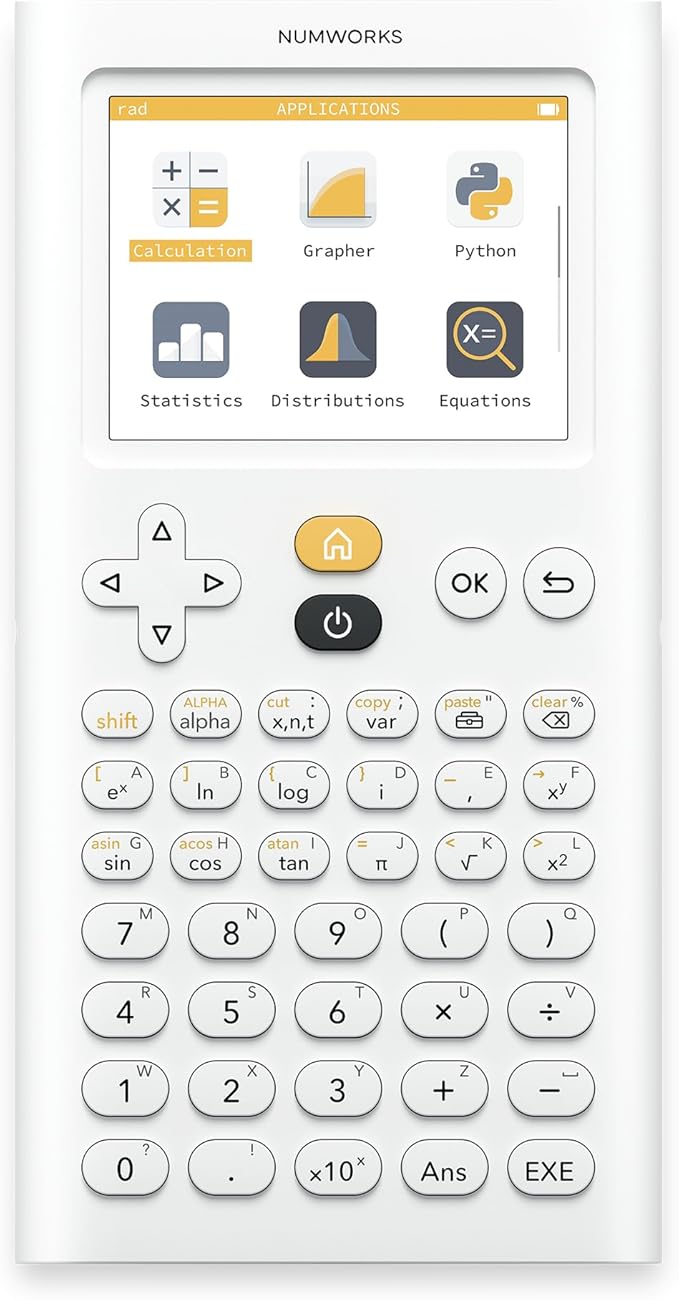
The NumWorks calculator is intuitively designed for student exploration in mathematics and includes a dedicated exam mode for official reviews.

Fast
Shipping

Free
Return*

Secure Packaging

100% Original Products

PCI DSS Compliance

ISO 27001 Certified


Note: Step Down Voltage Transformer required for using electronics products of US store (110-120). Recommended power converters Buy Now.


What Stands Out
User-Friendly Interface
Designed for ease of use, the intuitive interface allows students and professionals to navigate complex calculations quickly, making math learning and problem-solving more efficient.
High-Resolution Display
Equipped with a vibrant high-resolution display, this graphing calculator provides clear and detailed graphs, ensuring users can visualize data trends effortlessly and present their findings professionally.
Comprehensive Functionality
Offers a wide range of functions, including advanced calculus and statistics, addressing the needs of both high school students and college professionals, enabling users to tackle a variety of mathematical problems with confidence.
Product Details
- User friendly and easy to learn graphing calculator for high school students
- High resolution color screen (320 x 240 pixels) for clear display
- High capacity rechargeable battery with 20+ hours per charge
- Supports multiple languages: English, French, German, Spanish, Portuguese
- Includes USB-C charging cable for convenient recharging
- Ergonomic design with transparent and open collaboration for collective intelligence
| Calculator Type | Graphing |
| Power Source | Battery Powered |
| Screen Size | 2.8 Inches (7.1 cm) |
| Number of Batteries | 1 Lithium Ion batteries required. |
| Compatible Devices | Smartphone |
| Display Type | LCD |
| Color | White |
| Enclosure Material | Plastic |
| Item Dimensions L x W | 6.3"L x 3.2"W (16 cm) |
| Brand | NumWorks |
| Model Name | Graphing Calculator |
| Manufacturer | NumWorks |
| Mfr Part Number | N0100 |
| Model Number | N0100 |
| Unit Count | 1.0 Count |
| Package Weight | 1 Pound |
Who Should Buy?

-
Students
Ideal for high school and college students needing to visualize complex mathematical functions and graphing assignments.
-
Educators
Helpful for teachers to demonstrate mathematical concepts and engage students during lessons with visual representations.
-
Engineers
Beneficial for engineers who require precise graphing and calculations for design, analysis, and project planning.

-
Casual Users
Not suitable for those needing simple calculations as it may offer more complexity than necessary for basic tasks.
-
Very Young Children
Not appropriate for young children as its advanced features may overwhelm them without prior mathematical foundation.
-
Minimalist Approach
Not ideal for users who prefer straightforward tools as the interface may seem complex for basic graphing needs.
Product Description
Have any Query? Chat with us
Customer Questions & Answers
-
Question:
What features does the NumWorks Graphing Calculator offer?
Answer: The NumWorks Graphing Calculator is equipped with a user-friendly interface, advanced graphing capabilities, and support for various math concepts including functions, calculus, and statistics. Its dynamic graphing helps visualize complex equations and provides tools for in-depth analysis. This calculator also includes a programmable feature, allowing students to write their own functions and scripts, making it perfect for personalized learning in advanced mathematics or science courses. -
Question:
Is the NumWorks Graphing Calculator suitable for high school math courses?
Answer: Yes, the NumWorks Graphing Calculator is specifically designed to meet educational standards for high school math subjects such as Algebra, Geometry, and Calculus. Its intuitive graphical interface and interactive features make it an ideal tool for students tackling complex problems and developing a deeper understanding of mathematical concepts. Many educators recommend it for helping students visualize math concepts in an engaging manner. -
Question:
How does the NumWorks Graphing Calculator compare to other graphing calculators?
Answer: The NumWorks Graphing Calculator stands out due to its modern design, accessibility, and robust cloud functionalities. Unlike traditional models that can be complicated and difficult to navigate, NumWorks simplifies the user experience while incorporating powerful features. Its open-source operating system encourages innovation, making it appealing to tech-savvy students and educators who value customizable learning tools. -
Question:
Can the NumWorks Graphing Calculator be used for college-level mathematics?
Answer: Absolutely! The NumWorks Graphing Calculator is not just for high school; it is fully capable of handling college-level mathematics. It supports complex computations, statistical analysis, and calculus functions, making it appropriate for a variety of advanced courses. College students can leverage its features for graphing functions, conducting statistical experiments, or programming specific mathematical models. -
Question:
Does the NumWorks Graphing Calculator have a rechargeable battery?
Answer: Yes, the NumWorks Graphing Calculator features a rechargeable battery which adds convenience for daily use. This feature ensures that students do not have to constantly replace batteries, making it a more sustainable option. Users can recharge it via USB, making it easy to maintain the calculator's performance during long study sessions or class time without interruptions. -
Question:
Can I program my own functions on the NumWorks Graphing Calculator?
Answer: Yes, one of the distinctive features of the NumWorks Graphing Calculator is its ability to allow users to program their own functions. It uses Python, a popular programming language, enabling students to create scripts for specific calculations or simulations. This feature not only enhances computational efficiency but also encourages students to learn coding practices alongside math, bridging two essential skills. -
Question:
Is there a tutorial or manual available for using the NumWorks Graphing Calculator?
Answer: Yes, the NumWorks website offers extensive resources, including a user manual and tutorial videos that guide users through its features and functionalities. These resources can significantly aid anyone unfamiliar with graphing calculators or those wanting to maximize their usage. Whether you are a beginner or an advanced user, these tutorials provide step-by-step assistance for navigating various features, from basic functions to advanced graphing techniques. -
Question:
Does the NumWorks Graphing Calculator support statistical functions?
Answer: Definitely! The NumWorks Graphing Calculator comes equipped with various statistical functions, making it a versatile tool for students. It can perform operations such as mean, median, mode, standard deviation, and regression analysis. This feature aids students in comprehensively understanding data analysis while studying statistics, making it a valuable asset in both academic and research scenarios. -
Question:
How durable is the NumWorks Graphing Calculator?
Answer: The NumWorks Graphing Calculator is designed with durability in mind, featuring a sturdy construction that can withstand everyday classroom wear and tear. Its quality materials and robust design ensure that it remains functional even with regular use. This level of durability is essential for students who may carry their calculators in backpacks and use them frequently throughout studies. -
Question:
Where can I buy the NumWorks Graphing Calculator?
Answer: You can conveniently purchase the NumWorks Graphing Calculator through Ubuy in Burundi. Ubuy offers a streamlined shopping experience, allowing you to browse the latest models and take advantage of exclusive offers tailored to meet your educational needs.
NumWorks Graphing N0100 Editorial Review


The Numworks calculator is an easy-to-use programmable calculator that runs on MicroPython, allowing users to run custom code on the calculator to create a stoicheometry calculator or other tailored applications. The calculator is thin, light and has a clean design with an app-based interface. The calculator even allows users to simplify radicals and calculate complex numbers. Users appreciated the calculator's cost efficiency, updated interface, and open source hardware. However, users found the buttons somewhat mushy and the calculator's white plastic easy to scratch and mark. The keyboard was hard to use, and some of the keys were not very intuitive to access. Additionally, users found that the graphing program was slow when navigating, and the basic functionality of the calculator was sometimes limited. Overall, Numworks calculator is suitable for students, educational projects, and home use.
Customer Reviews & Ratings
8618 customers ratings
-
5 Star
87%
-
4 Star
8%
-
3 Star
1%
-
2 Star
1%
-
1 Star
3%
Review this product
Share your thoughts with other customers
Pros
- Easy-to-use app-based interface
- Thin and light
- Open source hardware with MicroPython functionality
- Simplifies radicals and calculates complex numbers
- Clean design
- Costs less than the TI-84-plus CE
- Updated interface compared to TI-84
Cons
- Buttons mushy and not intuitive
Product Price History
Important information
- Limitations : For products shipped internationally, please note that any manufacturer warranty may not be valid; manufacturer service options may not be available; product manuals, instructions, and safety warnings may not be in destination country languages; the products (and accompanying materials) may not be designed in accordance with destination country standards, specifications, and labeling requirements; and the products may not conform to destination country voltage and other electrical standards (requiring use of an adapter or converter if appropriate). The recipient is responsible for assuring that the product can be lawfully imported to the destination country. When ordering from Ubuy or its affiliates, the recipient is the importer of record and must comply with all laws and regulations of the destination country.
- Not all the products listed on Ubuy are for sale, as Ubuy is a global search engine. Products are subject to export/trade regulations.
BIF 472464
Order now and get it around Sunday, June 28
This item is not restrict in my country.(Please click on above link if this item is not restrict in your country, So our team will review and allow.)
QTY:
Secured transaction
Ubuy works hard to protect your security and privacy. Our advanced payment security system ensures confidentiality by encrypting your information during transmission using AES (Advanced Encryption Standards) and SSL (Secure Socket Layer) protocols. Your payment details are 100% secure as we do not share your payment details with third party sellers.
Our Top Logistics Partners
Fastest cross-border delivery
Features & Benefits
- Customizable for new educational programs.
- Designed in collaboration with numerous educators.
- Features an intuitive interface for easy results.
- Includes a mandatory exam mode for national assessments.
- First calculator to offer a Python app tailored for school curricula.
- High-resolution color display and long-lasting rechargeable battery.